
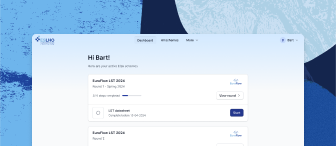

Step 1: Browsing EQA schemes and selecting schemes for registration
Make sure that you are logged in to the ESLHO EQA Portal
Go to the “All Schemes” tab to browse all available EQA schemes
For each scheme, information about the registration period is provided (when the registration period will open, until when it will be open, or that it closed already)
Click on a scheme to access general info, timeline, and resources; return to the initial view by clicking the ESLHO logo in the top left of the screen or via the “back” button of the browser
When viewing the details of a scheme (General info/Timeline/Resources view), select the round(s) that you would like to register for, and click “Register”; this will take you to the registration page, where you can select additional schemes/rounds that you would like to join
Alternatively, go straight to the registration page (“Register” tab), and select the schemes/rounds that you would like to join; click “Finish registration”
The possibility to register for a scheme and the participation fee of a scheme can vary according to whether or not your lab is an active participant of the network that co-organizes the EQA scheme; you can view your networks under Lab settings
If you have already completed the registration for a round, this round is selected and cannot be deselected; it is not possible to register twice for the same round
Under “My Order” in the top right you can find the total costs of the schemes that you selected, including information about discounts, extra fees, etc.
Related articles
Need further assistance?
We’re here to help. If you have any questions or need more information, please don’t hesitate to reach out.
Contact us