

Quick guide to ESLHO EQA Portal
Go to https://eqa.eslho.org/
Create an account, either with single sign-on or with your email address; invite colleagues to your lab if required, they will receive an invitation to create an account and are automatically linked to your lab
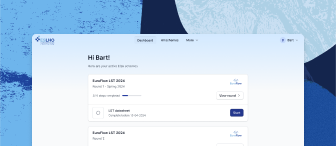
Browse all available EQA schemes in the “All Schemes” tab
Register for EQA schemes in the “Register” tab (for labs that are formal participants of the EuroClonality, EuroFlow, and EuroMRD consortia, an admin needs to update your lab settings accordingly before you can register)
View your active EQA schemes and open tasks/to do’s in the “Dashboard” tab
Edit your personal and lab account settings via the menu with your name in the top right corner
Related articles
Need further assistance?
We’re here to help. If you have any questions or need more information, please don’t hesitate to reach out.
Contact us