

Help Center, Complaints, Contact, Report a bug
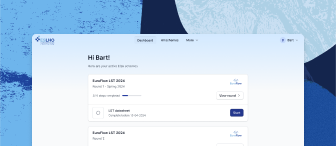
Via the “More” menu at the top of the screen, you can access the Help Center, the Complaints form, and Contact info.
The “More” menu also provides access to pages with info about ESLHO, the expert labs that support the EQA schemes, and news items
In addition, via the Help button (circle with the question mark) in the bottom right corner of the screen, you can access the Help Center and Contact info, or Report a bug.
In the Help Center, you can find an ESLHO EQA Portal manual and video tutorials, with explanations on the different functions of the website (creating an account, registration for EQA schemes, managing EQA schemes, etc.)
With the Complaints form, you can submit complaints related to the ESLHO EQA program and the ESLHO EQA Portal
You will receive a confirmation email when the complaint is received, a request for additional information if applicable, and we will inform you about progress or outcome
It is possible to submit anonymous complaints (i.e. it is not mandatory to provide your email address)
In the Contact info you can find which email address to use for general questions and questions about invoices, and the address of ESLHO
With the Report a bug form, you can let ESLHO know about any issues that you experienced while using the ESLHO EQA Portal, or about suggestions that you might have to improve the website
Related articles
Need further assistance?
We’re here to help. If you have any questions or need more information, please don’t hesitate to reach out.
Contact us